





Process and organization
6 best practices for cross-posting on social media
Discover 6 best practices for cross-posting on social media to save time, boost engagement, and adapt your content effectively across Instagram, LinkedIn, TikTok, Facebook, and X.

Table of content
When you’re managing multiple social media accounts, keeping up with content can feel like a never-ending task. You want to stay consistent, keep engagement high, and maximize your reach.
But who has the time to post something fresh and original on every single platform, every single day?
Enter: cross-posting. It’s one of the simplest ways to streamline your social media strategy, ensuring that great content reaches as many people as possible.
But cross-posting isn’t just about copying and pasting the same post everywhere. What works on Instagram won’t necessarily work on LinkedIn. Not unless the content is edited according to the nuances of that platform.
So how do you cross-post efficiently, without making it obvious that you’re reusing content?
Let’s take a look!
What is cross-posting?
Cross-posting is when you share the same content across multiple social media platforms. But the key to doing it well is adaptation. It’s not about blasting the exact same post everywhere, it’s about tweaking your content so that it fits the style, format, and audience expectations of each platform.
For example, if you’re posting a product demo video:
- On Instagram and TikTok, you want to make sure that the video looks like it’s been created on a phone – that it isn’t overly branded or corporate. That might mean you need to repurpose an existing demo video into something more suitable (i.e. more ‘lifestyle’) for these platforms
- On LinkedIn, you might get away with the original product demo video (especially if it’s more corporate in style) – just make sure that the caption speaks to the right audience and is formatted correctly
- On X (Twitter) you might not post the video at all, instead turning its content into a thread, highlighting the key takeaways
The goal is to maximize your content’s reach while making it feel native to each platform. Because let’s be honest – nobody wants to scroll through a feed full of posts that look like they were copy-pasted from somewhere else.
How easy it is to get cross-posting wrong
Every platform has its nuances, and that's why you can't simply copy and paste content from one channel to another. In terms of tone, LinkedIn is – broadly speaking – more professional than Facebook, which is more informal and chatty.
But it’s not just about tone. It's also about the way the platforms work and how content is presented.
For example, lots of Instagram Reels have the text "read the caption below for more info" written on top of the video. This works on Instagram because the caption is – you guessed it! – below the video. But on LinkedIn, the opposite is true. Therefore, the meaning of 'read the caption below' would get lost if you were to share the Reel directly on LinkedIn without making any changes.
The format of a carousel on Instagram is also completely different compared to LinkedIn. On Instagram, you can upload up to 20 jpegs/pngs in the order you desire. On LinkedIn, if you want a proper, swipeable carousel you actually have to upload a 'PDF'. If you were to upload a series of images, the formatting wouldn't look right. This is important if you're sharing a text-based carousel and the sequence of the slides matters.
The benefits of cross-posting (when done right)
When do right, cross-posting helps you:
- Save time: No need to create brand-new content for every single channel.
- Stay consistent: Regular posting keeps your brand visible and top-of-mind.
- Increase engagement: Some content performs better on certain platforms than others, giving you more chances to connect with your audience.
- Repurpose high-performing content: If something is working well on one platform, why not extend its lifespan by tweaking it for another?
But cross-posting isn’t a magic fix.
If you don’t take the time to adapt your content properly, it can have the opposite effect – making your brand look out of touch.
How to cross-post efficiently without damaging engagement
Cross-posting isn’t about taking shortcuts—it’s about making sure your content works across different platforms without feeling forced or robotic. Here’s how to get it right:
1. Customize your captions
A good caption on Instagram isn’t necessarily a good caption on LinkedIn. And what works on X might fall flat on Facebook.
If you’re posting the same content across different platforms, take a few minutes to tweak the wording so it matches the tone and audience of each one.
- Instagram and TikTok are casual and conversational: Think emojis, hashtags, and short, engaging sentences
- LinkedIn is more professional and insight-driven: Skip the hashtags and focus on providing value
- Facebook is community-focused: Questions and storytelling work well here
- X is short and punchy: Get to the point and make every character count
A little adaptation goes a long way.
2. Format your media correctly
While traditional horizontal video still works on LinkedIn, it doesn’t really work on TikTok or Instagram. You can still publish them, but in most cases, it won’t perform very well compared to vertical video.
As far as imagery goes, now that Instagram has switched to a 3:4 grid, the ideal size for a photo is portrait – or 1080 x 1350 px.
Understanding the optimum sizes and formats for each platform is essential if you want cross-posting to look natural and, more importantly, generate results.
And remember – no matter where you’re posting video, don’t forget to add captions as most people scroll with the sound off.
3. Be strategic about timing
Just because you can schedule all your posts at the same time doesn’t mean you should.
Each platform has different peak engagement times. LinkedIn tends to perform best in the morning when people are checking in before work, while Instagram and TikTok are – generally speaking – strongest in the evenings when users are winding down.
💡 Must-read: Best times to post on Instagram
💡 Must-read: Best times to post on TikTok
But that’s not the only thing to consider when it comes to timings.
If you’re going to cross-post, try to be clever about it. Stagger when you cross-post so that you don’t have similar content going out on the same date, at the same time, across all your social media channels.
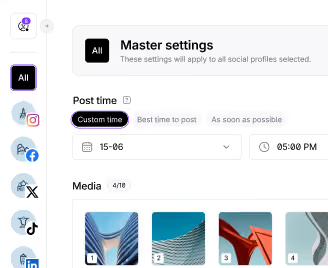
For example, if you’re planning to cross post a video on LinkedIn and Instagram, post it first on Instagram on Monday at 5pm. Then edit the caption (and video if necessary) and schedule it to go out a couple of weeks later (if it’s not time-sensitive) on LinkedIn.
4. Don’t cross-post everything
It’s highly unlikely that every single post created for Instagram will work on another platform. Even with edits.
So don’t fall into the trap of cross-posting everything. If you want to build a presence on another channel like LinkedIn, cross-posting will only get you so far. To really see results, you’ll need to develop a specific strategy tailored to that audience.
5. Avoid relying too much on automation
Automation is great, but it’s not foolproof.
Auto-sharing an Instagram post to X without adjusting the caption? That’s how you end up with a post that cuts off mid-sentence and a bunch of misplaced hashtags.
Cross-posting should be thoughtful, not automated to the point of being robotic.
6. Test, track and tweak
Not every piece of content will work equally well on every platform. And that’s okay.
Pay attention to what gets engagement, what flops, and where your audience is most active. If something is working on Instagram but not on LinkedIn, tweak the format and test a different approach.
Social media is about learning and adjusting. The more you experiment, the better your cross-posting strategy will become.
Common cross-posting mistakes (and how to avoid them)
Even experienced social media managers make mistakes when cross-posting. Here’s what NOT to do:
- Copy-pasting without adjusting captions: Your audience can tell. And it doesn’t look good.
- Ignoring platform-specific features: X threads, Instagram carousels, LinkedIn articles—each platform has unique formats that you should be taking advantage of.
- Overusing hashtags where they don’t belong: Hashtags still work on Instagram and TikTok (though they’re definitely not necessary!), but a LinkedIn post with 15 hashtags? That’s so 2018.
- Posting at the wrong time: Your audience isn’t active 24/7. Timing matters.
- Forgetting to track performance: If you don’t check your analytics, how will you know what’s working?
Make cross-posting seamless with Iconosquare
Cross-posting takes effort and planning, but the right tools can make it a whole lot easier.
With Iconosquare, you can:
- Schedule and customize posts for multiple platforms in one place.
- Preview how posts will look before they go live.
- Automatically resize images and videos for different platforms.
- Find the best times to post based on real audience insights.
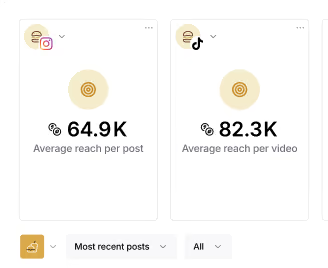
- Track engagement and performance to fine-tune your strategy.
Instead of juggling multiple tabs, tweaking posts manually, and hoping for the best, you can manage everything from one dashboard and get back to creating great content.
Try Iconosquare for free today
Cross-posting isn’t about doing less work—it’s about working smarter.
When done right, it can save time, boost engagement, and help your brand stay consistent across multiple platforms.
The key? Adapt your content for each platform while keeping your brand voice strong. And if you want to make the whole process easier, a scheduling tool like Iconosquare is your best bet.
Ready to streamline your social media strategy? Sign up for a free trial today. No credit card required.
![Iconosquare is free for 14 days! With Iconosquare, take your social media in another level. Experience the easiest-to-use platform on the market for free ��{{ include_custom_fonts({"Gilroy":["Audacieux","Moyen","Semi-gras"]}) }}](https://hubspot-no-cache-eu1-prod.s3.amazonaws.com/cta/default/143669362/interactive-258640909509.png)
%201.svg)

%201.svg)
%201.svg)