




Secret tools and hacks
Social Media Image Sizes: The Complete 2026 Guide
Complete 2026 guide to social media image sizes for major social networks. Find exact dimensions, aspect ratios, safe zones, and best practices to avoid cropping and pixelation.

Table of content
Creating visually consistent, high‑impact posts starts with using the right social media image sizes.
Getting dimensions wrong leads to cropped logos, misaligned text, and degraded quality, especially on mobile. It’s no longer optional, but a must‑do for every brand and creator who wants their content to look polished, consistent, and scroll‑stopping on every platform.
From Instagram carousels to YouTube Shorts, each social network you manage has its own “sweet spot” for dimensions and aspect ratios that make your visuals look sharp and professional in the feed.
This guide focuses on all major platforms, Instagram, Facebook, LinkedIn, TikTok, X, Threads, Pinterest and YouTube, using the exact sizes you’ve planned. Think of it as your go‑to reference for building a visual system that works across all your channels.
Instagram image sizes
Instagram profile picture size
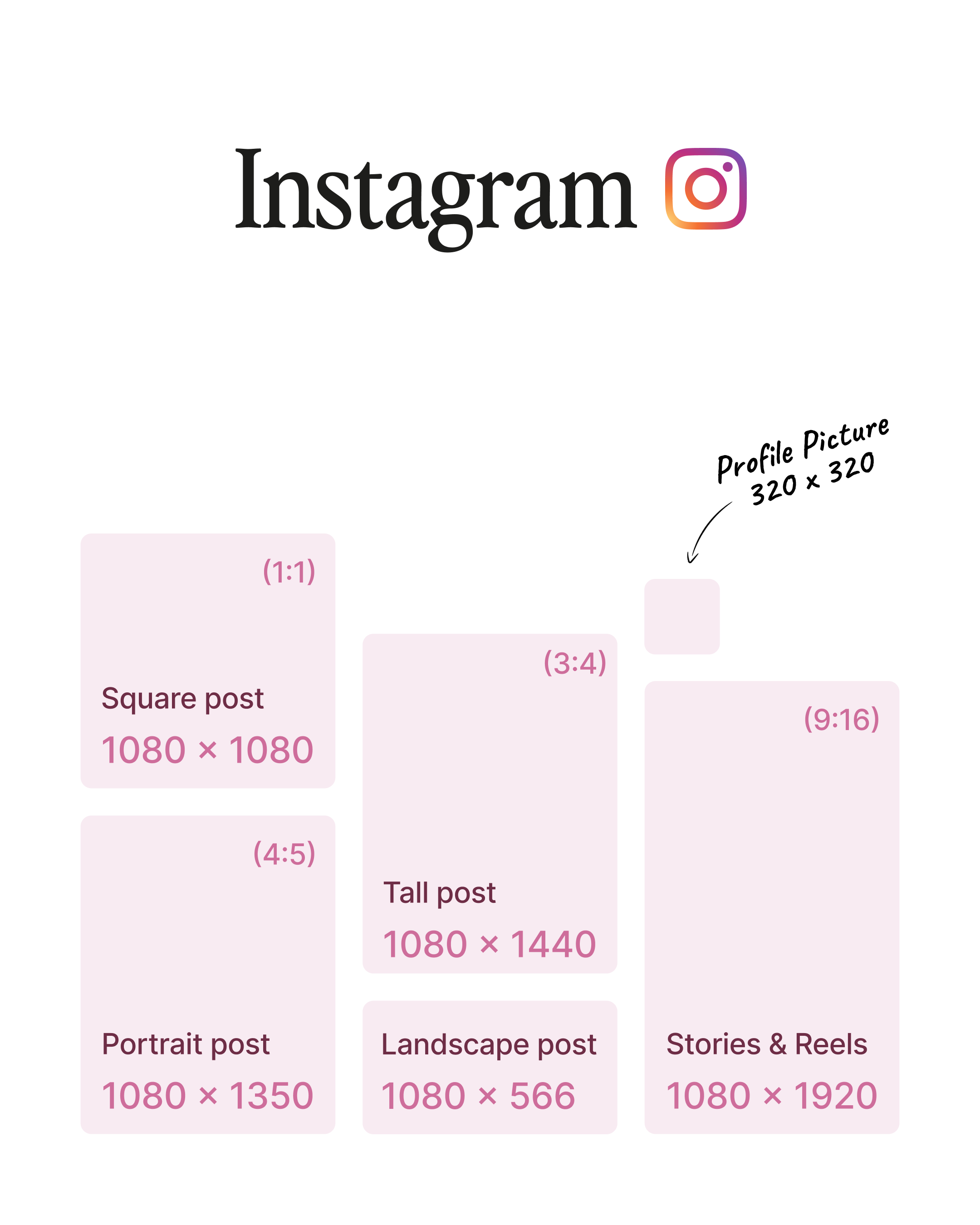
Upload your Instagram profile picture at 320 × 320 px (1:1), even though it will display smaller and cropped into a circle. Keep the subject centered and avoid tiny details or text on the edges so your logo or face stays clearly visible on both mobile and desktop profile views.
Instagram portrait post
For Instagram portrait posts, use 1080 × 1350 px (4:5). This format maximizes vertical space in the feed without being cropped, making it ideal for educational carousels, product shots, and storytelling sequences optimized for mobile.
Instagram square post
Set Instagram square posts to 1080 × 1080 px (1:1). This classic square format is perfect for simple layouts, quotes, and product grids, and remains one of the most versatile choices when you want a consistent look across your grid.
Instagram tall post size
Use 1080 × 1440 px (3:4) for Instagram tall posts designed to work with Instagram’s newer grid preview architecture. This format gives you a little extra vertical real estate while still fitting naturally within the feed and grid, as long as you keep key elements centered.
Instagram landscape image size
For Instagram landscape images, post at 1080 × 566 px (1.91:1). This is great for cinematic or panoramic content, but it will appear less tall in the feed compared to portrait posts, so place important text and visuals toward the middle to avoid them feeling too small on mobile.
Instagram Stories and Reels size
Instagram Stories and Instagram Reels should be exported at 1080 × 1920 px (9:16). This full‑screen vertical format is built for mobile and requires a central safe zone so that UI elements like captions, buttons, and usernames don’t overlap your main message.
Instagram Reels thumbnail size
Use 1080 × 1920 px (9:16) for Reels thumbnails as well, keeping in mind that they are cropped to 4:5 in the feed and 3:4 on the profile grid. Design the thumbnail so your key visual and text sit in the central area that stays visible across all these different crops.
Facebook image sizes
Facebook profile picture size
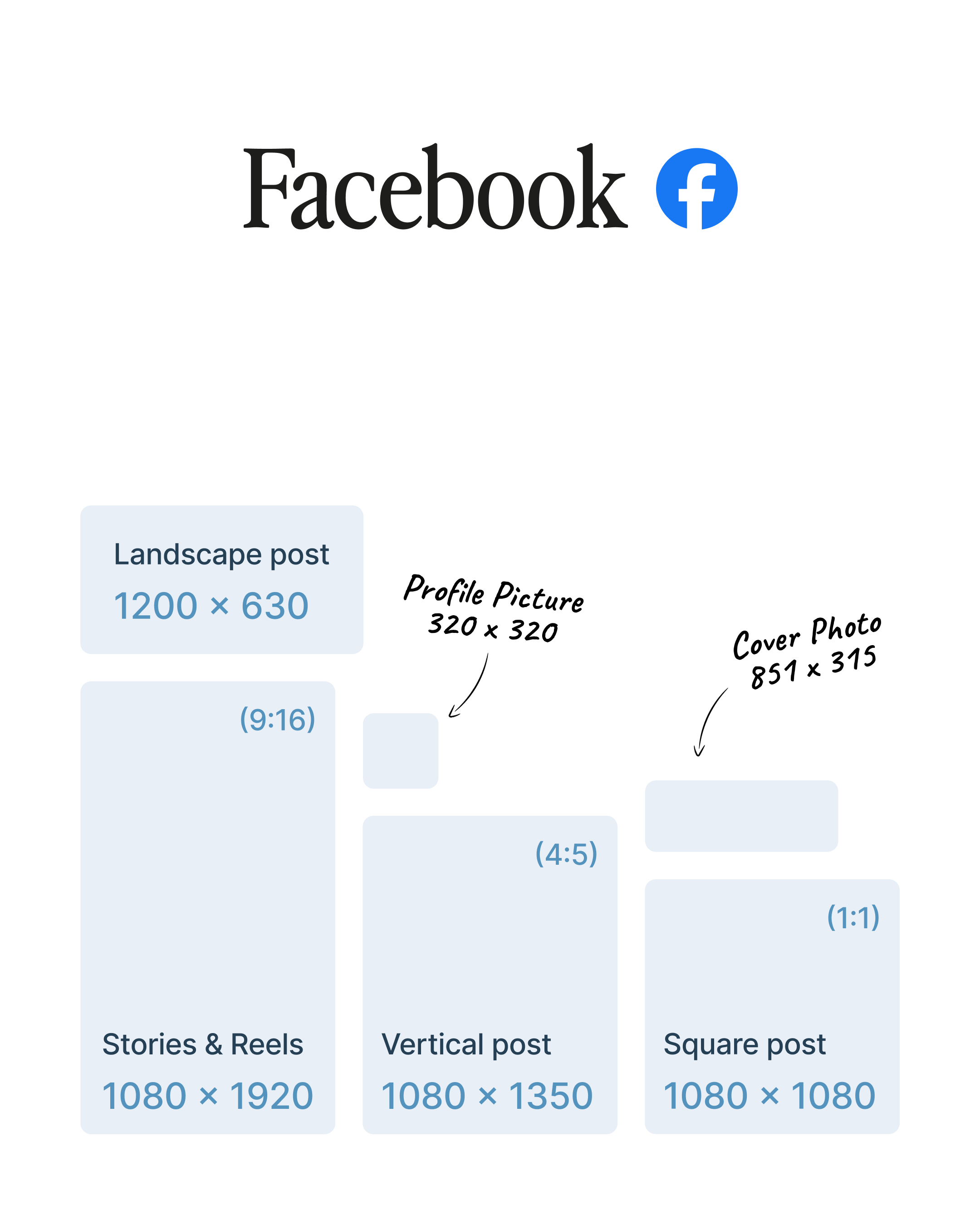
Upload your Facebook profile picture at 320 × 320 px (1:1). It’s displayed at smaller sizes (170 × 170 on desktop and 128 × 128 on mobile) and cropped into a circle, so keep your logo or face centered and avoid borders or text close to the edges.
Facebook cover photo size
Use 851 × 315 px (2.7:1) for your Facebook cover photo. This size ensures good quality, while anything below 400 × 150 px risks looking pixelated; make sure your key visuals sit in the middle so they aren’t trimmed on narrower displays.
Facebook group cover size
Set Facebook group covers to 1640 × 856 px (about 1.92:1). This format gives you full visibility for community branding on both desktop and mobile, with no profile‑photo overlap, making it ideal for large titles and clear community positioning.
Facebook event cover size
For Facebook event covers, use 1920 × 1005 px (1.91:1). The higher resolution keeps text and logos sharp on event pages and recommended events surfaces, so it’s worth designing specifically for this canvas instead of reusing generic banners.
Facebook vertical post size
Facebook vertical posts should be 1080 × 1350 px (4:5). This portrait format is preferred for mobile feed engagement because it takes up more screen space and encourages users to stop scrolling and read your content.
Facebook square post size
Use 1080 × 1080 px (1:1) for Facebook square posts. This universal standard is ideal for simple updates, product features, and quote graphics, and translates well when repurposing assets for Instagram or other feeds.
Facebook landscape post size
For Facebook landscape posts, publish at 1200 × 630 px (1.91:1). This size is optimized for link shares and desktop viewing, ensuring that your previews look neat in the News Feed and on shared link cards.
Facebook Stories and Reels size
Stories and Reels perform best at 1080 × 1920 px (9:16). This immersive, mobile‑only vertical format fills the entire screen, so keep text and logos in the central area and away from top and bottom UI overlays.
LinkedIn image sizes
LinkedIn profile picture size
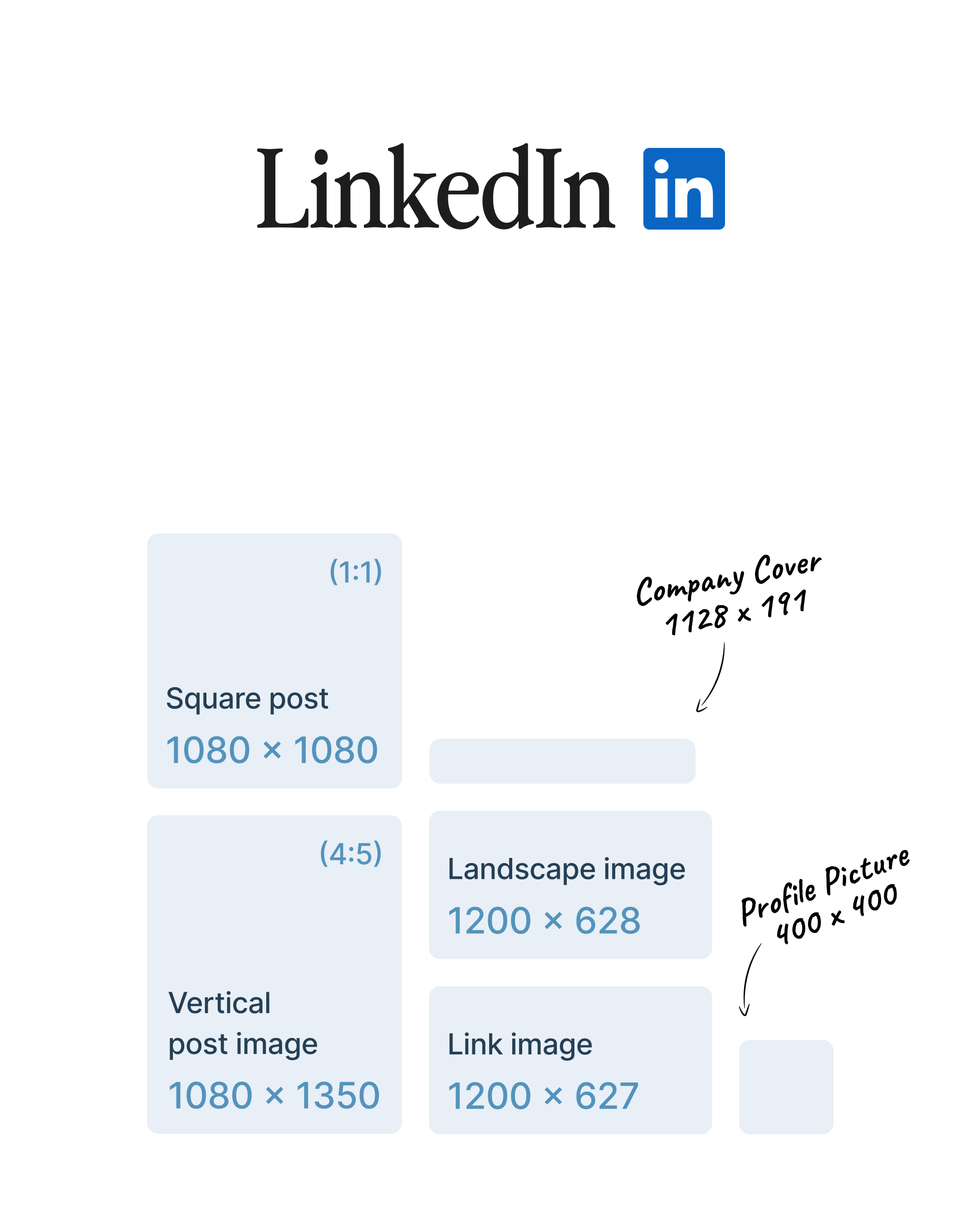
Upload your personal LinkedIn profile photo at 400 × 400 px (1:1). A centered composition ensures your face remains clearly visible in the circular crop used across desktop and mobile.
LinkedIn personal banner size
For LinkedIn personal banners, use 1584 × 396 px (4:1). Since LinkedIn crops differently on various devices, design your main visual and text within the central 1200 × 300 px area so they remain safely visible on smaller screens.
LinkedIn company logo size
Set your LinkedIn company logo to 400 × 400 px (1:1). A high‑resolution PNG with transparency works best here, keeping your brand mark sharp across the company page, search results, and sidebars.
LinkedIn company cover size
LinkedIn company cover images should be 1128 × 191 px (about 5.91:1). The banner is very wide and shallow, so keep all text and key visuals centered to avoid losing them to edge cropping on different screen sizes.
LinkedIn link image size
For LinkedIn link previews, design at 1200 × 627 px (1.91:1). This size corresponds to standard Open Graph images, ensuring your articles and landing pages display consistent, professional thumbnails when shared on LinkedIn.
LinkedIn square post image size
Use 1080 × 1080 px (1:1) for LinkedIn square images in posts. This high‑resolution standard is ideal for product shots, testimonials, and simple graphics that need to look crisp in the feed.
LinkedIn vertical post image size
LinkedIn vertical story‑style visuals work best at 1080 × 1350 px (4:5). This mobile‑first format gives your posts more vertical impact, making them harder to skip when users scroll through their feed.
LinkedIn landscape image size
For LinkedIn landscape images, use 1200 × 628 px (approximately 3:1, slightly taller than classic 16:9). This wide format works well for hero banners, presentations, or panoramic visuals that accompany thought‑leadership posts.
TikTok image sizes
TikTok profile picture size
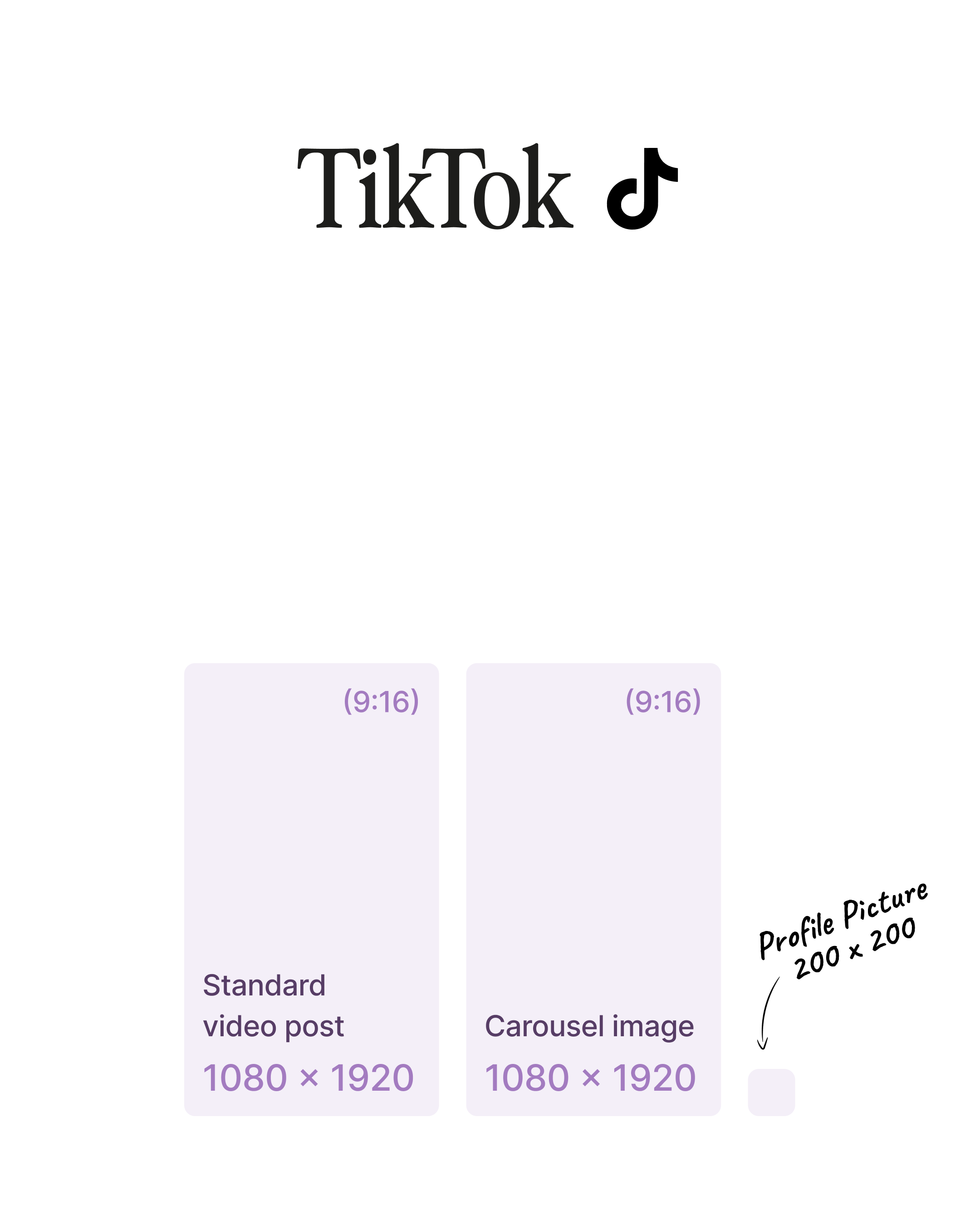
Upload your TikTok profile picture at 200 × 200 px (1:1) or higher. The image is displayed as a small circle, so minimalist logos and close‑up portraits perform best, with the focal point centered and away from the edges.
TikTok standard video post size
Standard TikTok videos should be 1080 × 1920 px (9:16). This full‑screen vertical ratio matches the way users naturally hold their phones and allows you to use the entire canvas without black bars or forced cropping.
TikTok carousel image size
For TikTok carousels, use 1080 × 1920 px (9:16) for each image. You can combine up to 35 slides per carousel, and keeping consistent dimensions across all slides ensures smooth swiping and a cohesive visual story.
TikTok video thumbnail size
TikTok video thumbnails should also be 1080 × 1920 px (9:16). A custom cover with clear text and a strong focal point can significantly improve view‑through rates, especially on the profile grid and the For You preview surfaces.
X (Twitter) image sizes
X profile picture size
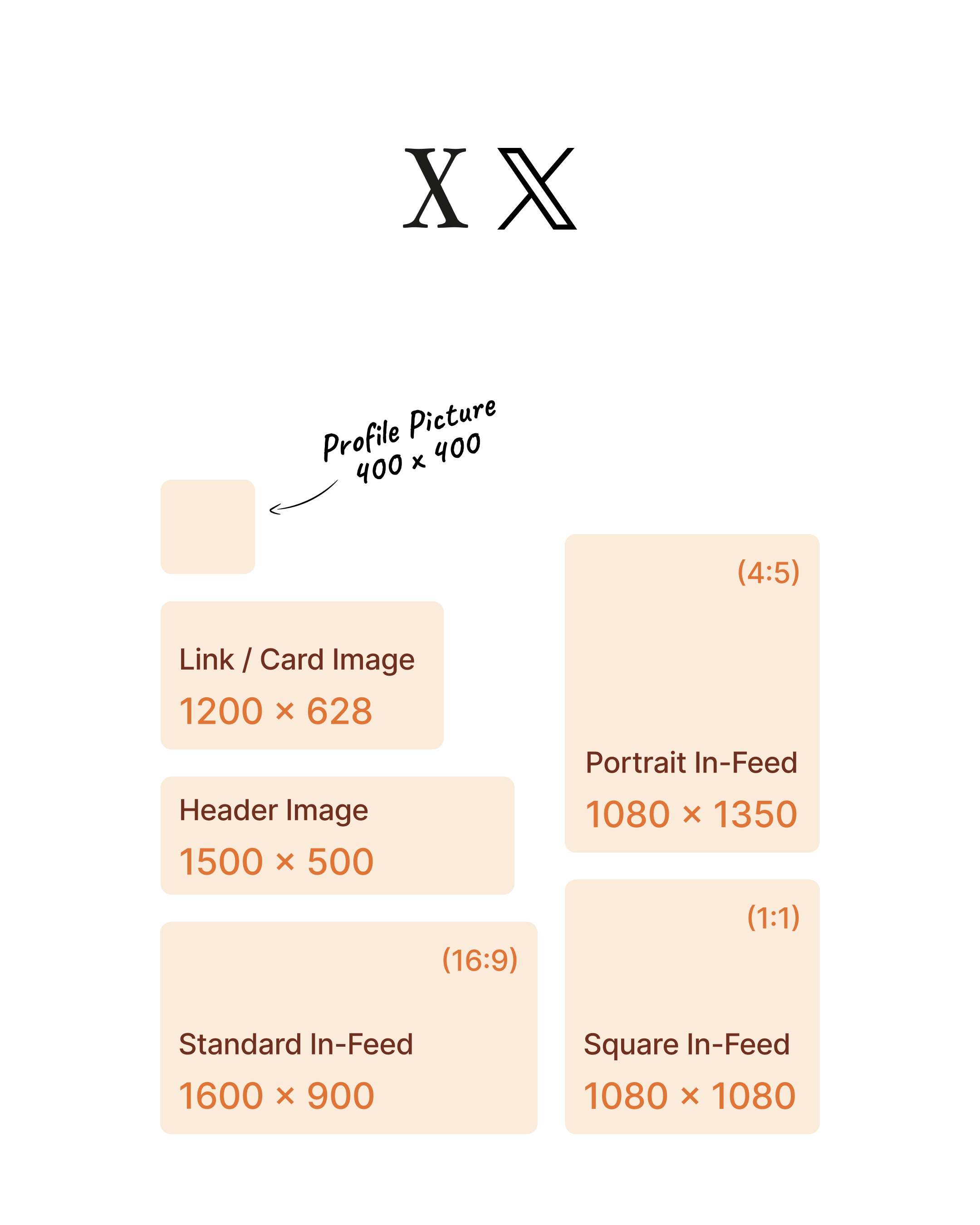
Upload your X (Twitter) profile picture at 400 × 400 px (1:1). It will show as approximately 128 × 128 px in the feed, so keep your logo or headshot large and centered to maintain clarity at smaller sizes.
X header image size
Set your X header image to 1500 × 500 px (3:1). The header is responsive and partially covered by your profile picture on some devices, so keep text and key visuals away from the bottom‑left corner where the avatar overlaps.
X standard in‑feed image size
For X standard in‑feed images, use 1600 × 900 px (16:9). This landscape ratio is ideal for general posts because it shows fully in the timeline without cropping, making it the safest default for most campaigns.
X square in‑feed image size
X square images should be 1080 × 1080 px (1:1). This format is particularly effective for text‑heavy graphics, quotes, and stats, since it gives more vertical presence in the feed than a classic landscape while remaining neatly framed.
X portrait in‑feed image size
X portrait images work well at 1080 × 1350 px (4:5). They deliver strong impact on mobile but may be partially cropped in the feed, so keep essential content in the central area to avoid cut‑offs.
X link / card image size
For X link cards, design at 1200 × 628 px (1.91:1). This is the standard card image ratio, ensuring consistent, professional link previews that look good both in the timeline and in embedded tweets.
Threads image sizes
Threads profile picture size
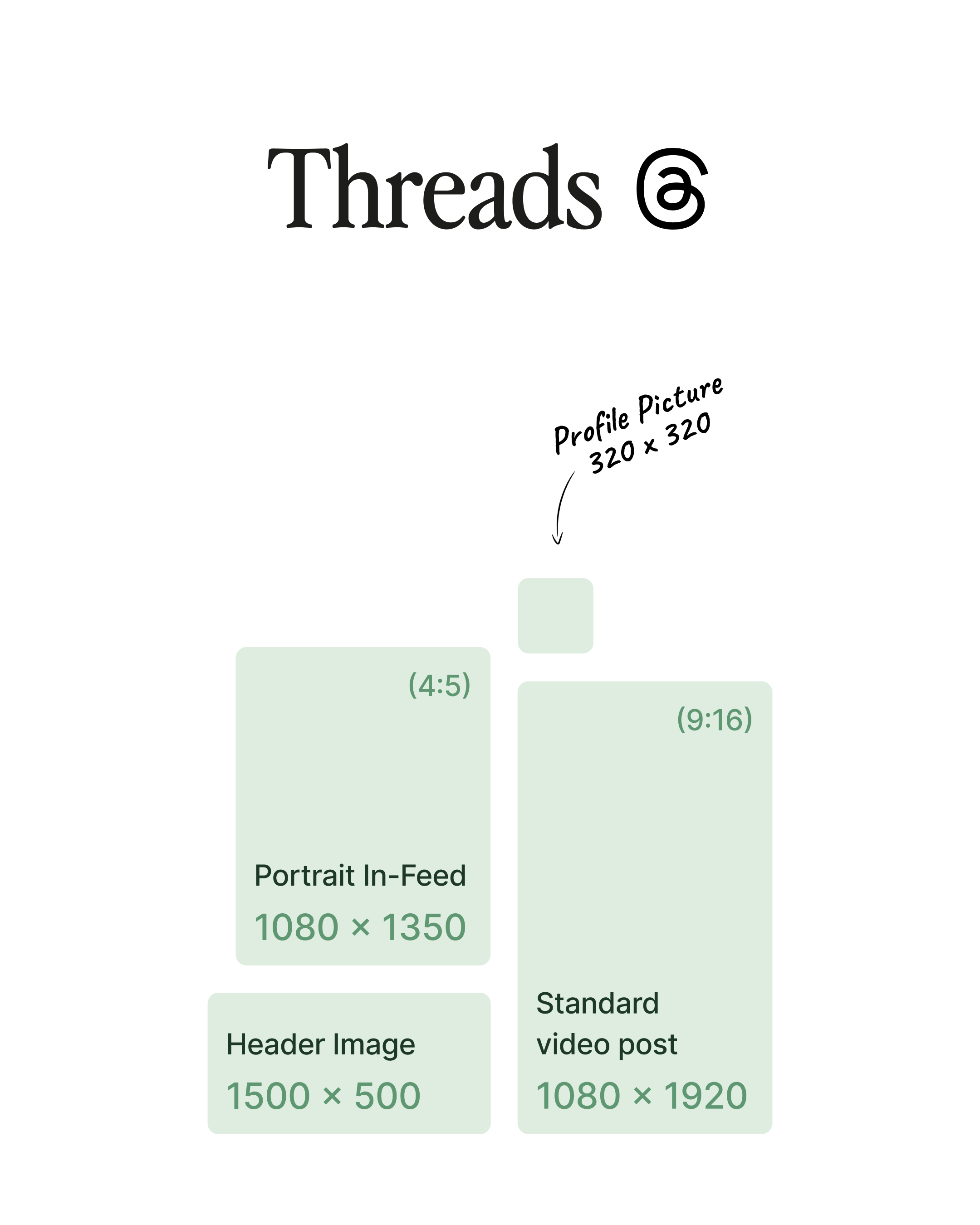
Upload your Threads profile photo at 320 × 320 px (1:1) or higher. Because Threads shares its profile system across the Meta ecosystem, keeping a clean, centered logo or portrait will help maintain consistency with your Instagram and Facebook presence.
Threads standard post size
For Threads standard image posts, use 1080 × 1350 px (4:5). Portrait images are preferred here for mobile engagement, giving your posts more height in the feed and making text or visuals easier to read at a glance.
Threads link preview image size
Link previews on Threads display best at 1200 × 600 px (2:1). This wide format matches many Open Graph defaults, so using it as your base size helps your articles and blog posts look polished whenever they’re shared.
Threads video post size
Threads videos should be exported at 1080 × 1920 px (9:16). Full‑screen vertical videos feel natural in the Threads experience, and keeping key messaging away from the bottom and top ensures it isn’t obscured by controls or captions.
Pinterest image sizes
Pinterest profile picture size
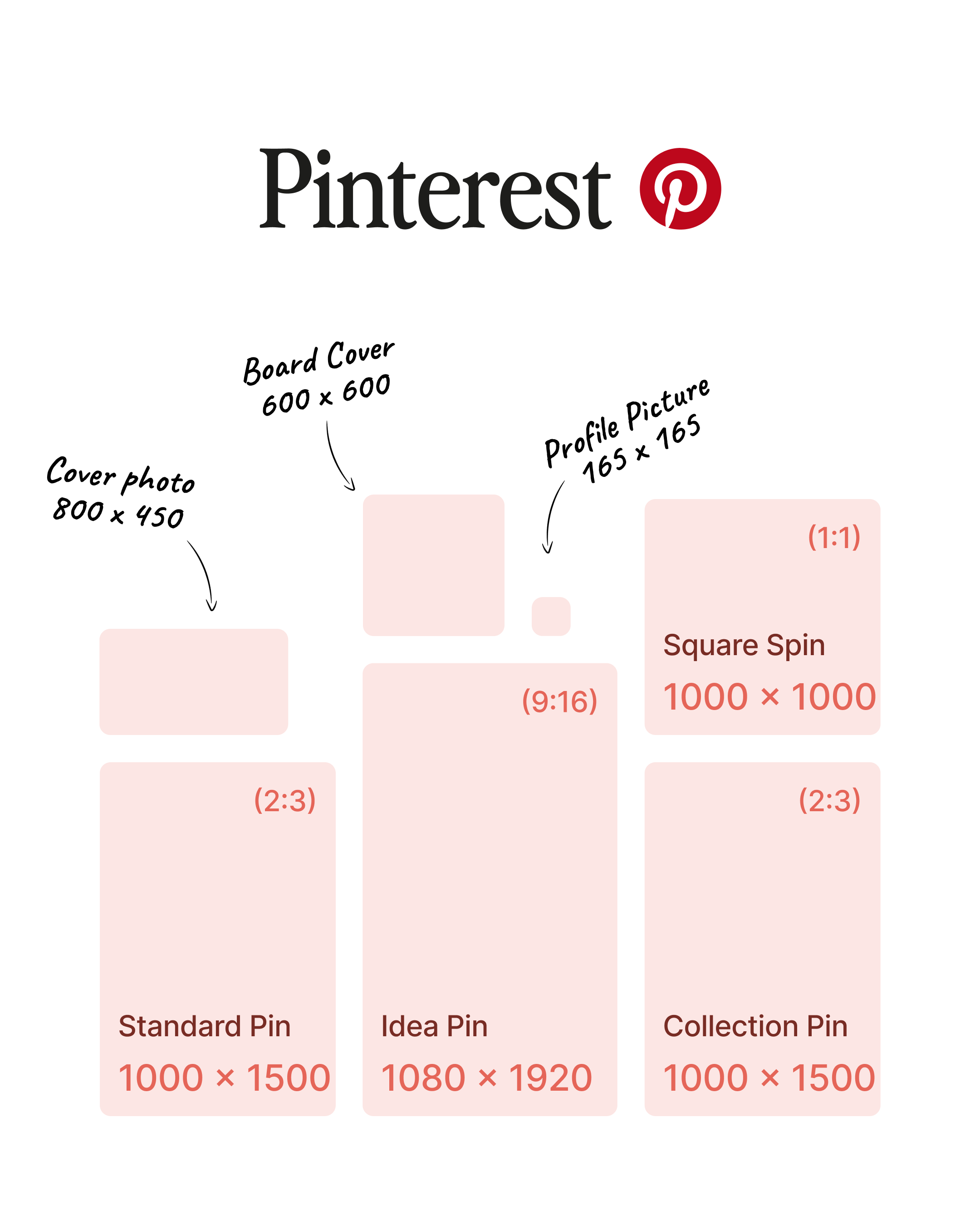
Upload your Pinterest profile picture at least at 400 × 400 px (1:1), even though Pinterest displays profile pictures at about 165 × 165 px. A higher‑resolution upload ensures your avatar remains sharp across different surfaces and devices.
Pinterest cover photo size
Use 800 × 450 px (16:9) for your Pinterest profile cover. This horizontal brand or lifestyle image sets the tone for your whole account, so keep it clean, on‑brand, and free from tiny text.
Pinterest standard pin size
Standard Pins should be 1000 × 1500 px (2:3). This is Pinterest’s preferred format for discovery and saves, as it strikes the right balance between vertical impact and readability in the main grid.
Pinterest square pin size
For square Pins, use 1000 × 1000 px (1:1). This format works well for simple product shots or minimal designs and is easy to reuse across other networks that favor square images.
Pinterest Idea Pin size
Idea Pins (multi‑page formats) should be 1080 × 1920 px (9:16). Treat them like vertical stories, with clear safe zones and legible text, as users will tap through multiple frames in a full‑screen experience.
Pinterest board cover size
Pinterest board covers are displayed at around 600 × 600 px (1:1), but uploading at higher resolution keeps them sharp. Consistent, branded board covers help organize your profile visually and improve recognition.
Pinterest collection pin size
For Collection Pins, design the hero image at 1000 × 1500 px (2:3). This gives enough space to highlight a main product or lifestyle visual while supporting additional smaller product tiles in the same unit.
YouTube image sizes
YouTube profile picture size
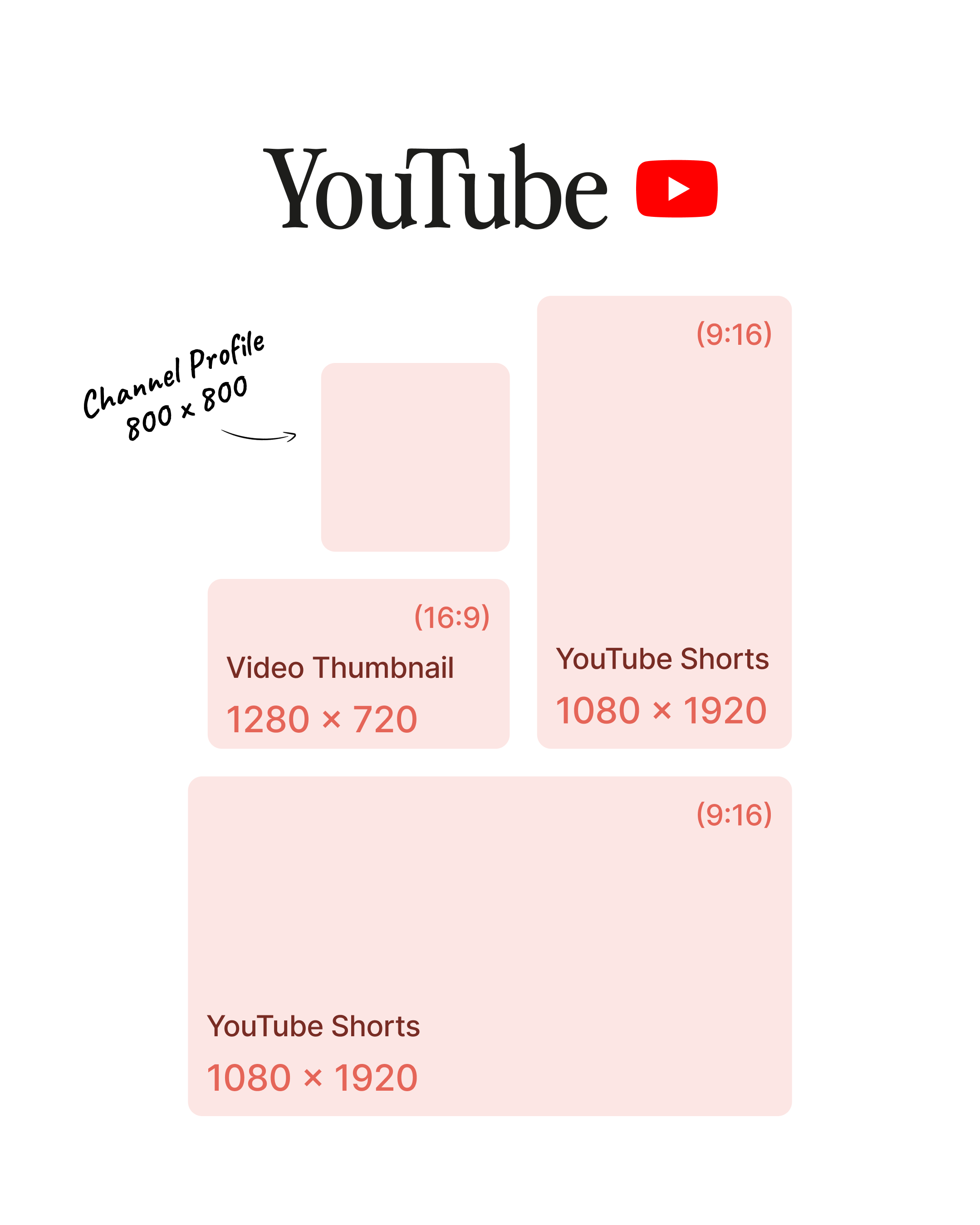
Upload your YouTube channel profile photo at 800 × 800 px (1:1). It’s displayed at around 98 × 98 px, so keep the subject centered and avoid small text; a simple, bold mark works best for recognition across channel pages and comments.
YouTube channel banner size
For YouTube banners, use 2560 × 1440 px (16:9). Only the central 1546 × 423 px area is guaranteed to display across all devices, so place any text or logos inside that safe zone to avoid them being cut off on TVs, tablets, or phones.
YouTube video thumbnail size
YouTube thumbnails should be 1280 × 720 px (16:9), with a minimum width of 640 px. This ratio matches the standard video player and search results, so using bold text, high contrast, and a clear focal point can significantly improve click‑through rates.
YouTube Shorts size
YouTube Shorts must be 1080 × 1920 px (9:16) to be recognized and distributed correctly as vertical short‑form content. Design them the same way you would for TikTok or Reels, keeping key elements away from the edges where UI elements and captions appear.
YouTube community post size
Use 1200 × 1200 px (1:1) for YouTube community posts. Square images are optimal for maximum visibility in the Community tab, though 4:5 portrait formats are also supported. Keep text and key visuals bold and centered for readability on both desktop channel pages and mobile apps.
YouTube playlist cover size
Design YouTube playlist covers at 1280 × 1280 px (1:1). These square thumbnails represent your playlists across the channel, search results, and recommendations. Use consistent branding across all playlist covers to create a cohesive channel identity that helps viewers quickly identify content themes.
FAQ about social media image sizes
What is the best image size for social media?
The best image size for social media is not a single fixed resolution, but a 1080‑pixel‑wide image adapted to each platform’s main aspect ratios.
For most feeds, aim for:
- Portrait 1080 × 1350 (4:5) when you want maximum screen space on mobile
- Square 1080 × 1080 (1:1) as an all‑round safe choice across networks
- Vertical 1080 × 1920 (9:16) for Stories, Reels, Shorts, and other full‑screen formats
Should I use the same image size across all platforms?
No. Each network has its own recommended aspect ratios and media image sizes. You can use Iconosquare’s scheduling tools to preview how the same social media image will look on Instagram, Facebook, LinkedIn, TikTok, X, Pinterest, and Threads, then adapt sizes accordingly. Iconosquare allow you to resize your images in one click.
What are the most important aspect ratios for social media images?
The key recommended aspect ratios for social media are:
- 4:5 portrait (1080 × 1350 px): Best for mobile feed posts across Instagram, Facebook, LinkedIn, and Threads
- 1:1 square (1080 × 1080 px): Universal safe choice for all platforms
- 9:16 vertical (1080 × 1920 px): Stories, Reels, Shorts, TikTok
- 2:3 (1000 × 1500 px): Pinterest standard pins
- 16:9 (1280 × 720 px): YouTube thumbnails, landscape videos
- 1.91:1 (1200 × 630 px): Link previews across most networks
These six ratios cover 95% of use cases. Design with platform-specific safe zones to avoid cropping issues on mobile vs desktop displays.
What is the best image format for social media (JPG, PNG, etc.)?
For most social media posts, JPG/JPEG is the best format because it offers good quality with relatively small file sizes, which helps your content load quickly on mobile connections. Use PNG when you need sharper graphics, transparency (like logos or icons), or text‑heavy visuals where crisp edges matter more than file weight.
What is the recommended weight or file size for social media images?
Keep social media images under 2 MB for fastest upload and load times across all platforms. Most networks will automatically compress larger files, which can blur details.
Wrapping up
Mastering social media image sizes transforms your content from "good enough" to scroll-stopping across every platform. These exact dimensions, aspect ratios, and safe zones ensure your visuals stay sharp, uncropped, and on-brand everywhere.
![Iconosquare is free for 14 days! With Iconosquare, take your social media in another level. Experience the easiest-to-use platform on the market for free ��{{ include_custom_fonts({"Gilroy":["Audacieux","Moyen","Semi-gras"]}) }}](https://hubspot-no-cache-eu1-prod.s3.amazonaws.com/cta/default/143669362/interactive-258640909509.png)
%201.svg)

%201.svg)
%201.svg)