





Process and organization
Google Search Console Can Now Show How Your Social Content Performs In Search
Google's new platform properties bring social and video content into Search Console for the first time. Here's what the feature tracks across Search, Discover, and News, what it deliberately leaves out, and how to turn the data into strategy.

Table of content
Although social media content is playing an increasingly important role in Search, when it comes to analytics, these two worlds operate separately. You measure a Reel by its in-app reach or with your favorite social media management tool, and a blog post by its Google clicks. The two rarely meet in the same report. That gap just narrowed! 👀
In July 2026, Google introduced platform properties in Search Console. This new property type connects social content with Google visibility data, giving social media managers, agencies, brands, and SEO teams a clearer view of how posts show up on the SERP. Moshe Samet, Search Console's product manager lead, announced it on the Search Central blog, and it's rolling out gradually over the coming weeks.
That matters because social posts are no longer just in-feed assets; they’re increasingly discoverable in Google’s surfaces, which makes search performance part of social performance too.
To help you get ready, we’ve put together a comprehensive guide. We'll cover what platform properties are, how to set it up, exactly what data you get, why it matters for your strategy, and how to turn the numbers into decisions. Yeah, that's quite a program!
What are platform properties?
You probably already know a property as something you verify and Google reports on. Until now, that always meant a website: a domain or URL prefix you own. The shift here is what now qualifies. Alongside websites, Search Console now recognizes social and video accounts as properties in their own right.
How does it work?
You connect an account — let’s say your brand's Instagram or a client's YouTube channel — and Search Console starts reporting how content from that account appears across Google surfaces. Four platforms are supported at launch: Instagram, TikTok, X, and YouTube; each supported platform is added as its own search console property.
A few characteristics set this apart from a standard website property:
- You don't need a website. Creators and publishers who work entirely on social platforms can use it, including those without their own websites who want to measure valuable content published directly there. Search Console is no longer only for site owners.
- Each account is tracked separately. If you run several social profiles, or the same brand across multiple networks, you add each one as its own separate property and read its data independently.
- It builds on an earlier test. Google ran a limited social-channels experiment in Search Console in December 2025; platform properties are the productized version of that.
How to set it up?

Setup follows Search Console's standard verification flow:
- First, open Search Console, then go to the verification page or open the property selector dropdown anywhere in Search Console and click Add property.
- Choose the platform property option and select the network you want to track; for example, choose Instagram when that's the account being connected.
- Follow the on-screen prompts to complete Search Console's verification process, securely authorize the connection, and verify ownership of that account.
- Repeat for every account and platform you manage; each of your social accounts becomes its own separate property.
A supported profile may not show up in your account immediately because rollout is gradual. Initial reporting may take a few days after verification.
Because there's no backfill, the sooner you verify, the sooner you start building a search-performance history you can actually learn from. Even if you're not ready to act on the data yet, connecting your accounts now means you'll have months of trend data available when you are. Verifying early costs you nothing and preserves data you can't recover later.
What social media data do you actually get from Google Search Console?
Each platform property comes with three reports, mirroring what you'd expect from a website property but tuned for social and video content. Here's how they compare at a glance:
Performance report
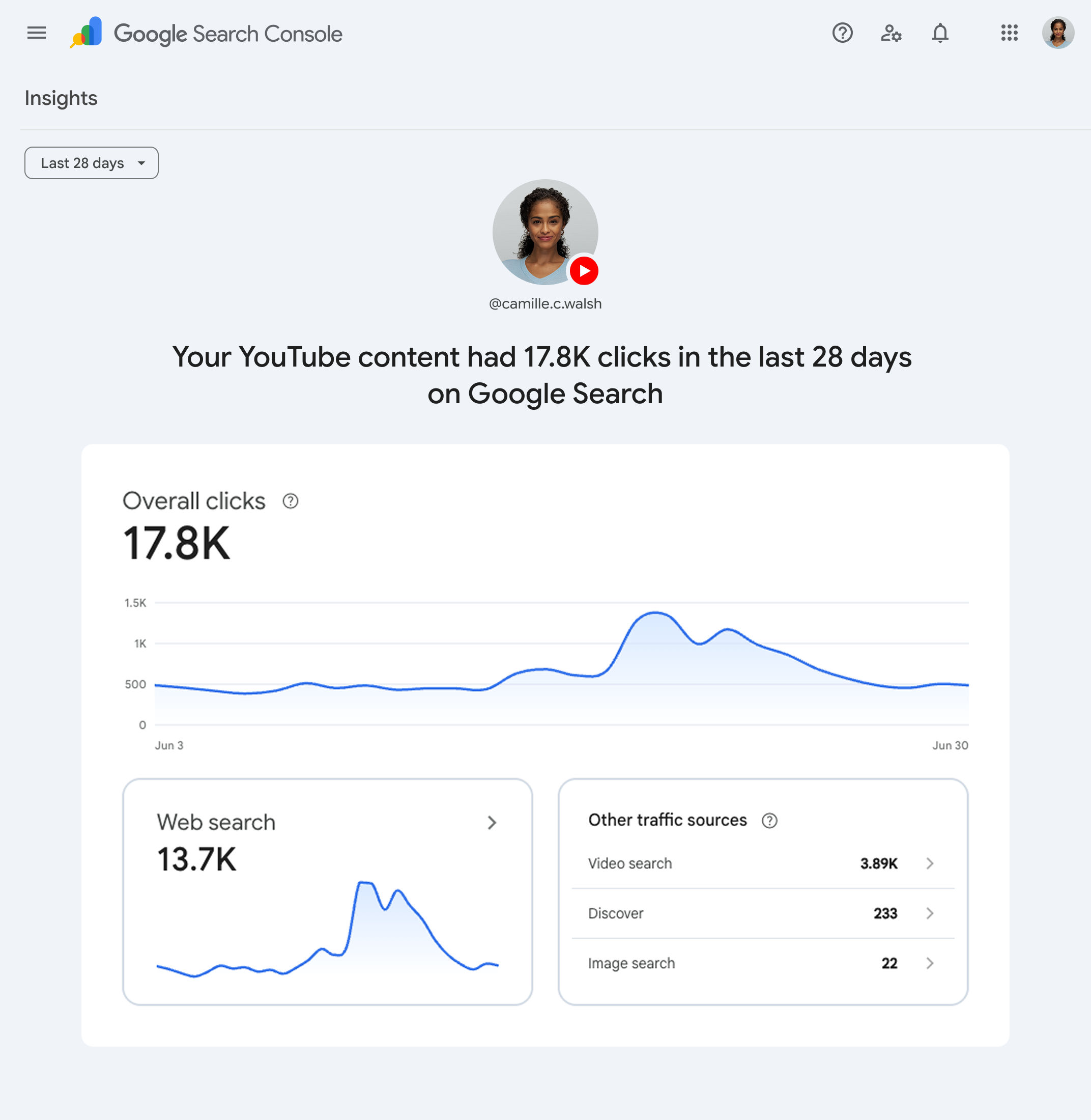
This is where you'll spend most of your time. It shows clicks, impressions, average CTR, and average position in Google results for the connected account. You can filter and sort by individual post, by search queries, and by search type — Web, Image, Video, or News — to see what's actually driving traffic and how those search queries reveal which search terms lead people to specific posts.
It isn't limited to web search, either: Discover and Google News data surface here too, though only when your content earns traffic from those surfaces in the first place. This report also helps explain how people discover your content, identify which posts get the most traffic, and compare pre- and post-campaign performance metrics.
Insights report
The high-level read: recent traffic trends, top-performing posts, how people are finding your account on Google, and how content is being discovered.
Achievements
Tracks growth milestones, such as crossing a new threshold for total clicks over a rolling 28-day window. It's more motivational than analytical, but it's a fast way to spot momentum worth acting on.
How does social content get counted on Search Console?
The metrics are the familiar Search Console four: clicks, impressions, CTR, average position. But how they're attributed to social formats has some edges worth knowing before you interpret a report.
Instagram Stories count as you'd hope: when a Story surfaces in Google Search, that's an impression, and a tap through is a click.
Video is where it gets interesting. When your video appears in results or Discover, that's an impression. A click is logged even when it opens inside Google's own video viewer rather than sending the user to the platform. In other words, a "click" here doesn't reliably mean a visit landed on Instagram, TikTok, or a YouTube video; some of that engagement is consumed within Google itself.
That's worth remembering before you reconcile these numbers against referral traffic in your platform or web analytics. They're measuring different moments, and they won't tie out.
Why platform properties don’t replace social media analytics tools
Keep in mind that platform properties measure Google performance only. They do not track what happens inside the social platform itself. Google's documentation says this plainly: the reports won't tell you how many times your video was viewed on TikTok, or how your Story performed within Instagram. If people discovered and engaged with your post entirely inside the app, none of that appears here.
That’s where a dedicated social analytics platform fits in is the gap Search Console deliberately leaves open. Pairing the two closes the loop: use Search Console for the Google-discovery picture, and a tool like Iconosquare for the in-platform performance, cross-network reporting, and competitive benchmarking that Google's data can't cover.
Read together, you get both halves of the story: how your content travels inside each network and how it travels through search.
Why this matters: social is now a search surface
Step back from the dashboard and the bigger signal is clearer than any single metric.
Google is now reporting search performance for content on properties you don't own outright. That's new. And it only makes sense to do that if Google considers social and video posts to be genuine search results worth measuring. Which is exactly what's been happening in the SERP!
Reels, TikToks, Shorts, and X posts increasingly surface directly in Google Search and Discover, alongside and sometimes above traditional web pages. And that's not to mention the LinkedIn posts, which we hope to see soon!

For social media managers, the practical takeaway is a shift in mindset. A post is no longer just something that performs (or doesn't) inside an app's algorithm. It's also a discoverable asset that can pull in people searching Google for a topic, a product, or an answer.
The teams that start treating social content as searchable, thinking about the queries a post might satisfy, not only the feed it's competing in, will have an edge over those still optimizing purely for in-app reach.
This also quietly bridges two functions that have long worked from different datasets. SEO and social teams can now look at a shared signal: the search demands that a piece of social content is actually captured.
How to turn the Search Console social media data into strategy
Raw metrics don't improve anything on their own. Here's how to make platform properties earn their place in your workflow and inform content strategy, not just reporting.
Find the posts Google already rewards
Sort the Performance report by clicks and impressions to see which social posts are pulling search traffic. These are proof of what resonates beyond your existing followers and often reveal topics worth turning into more posts when search interest persists, making them strong candidates to expand into a series, repurpose into other formats, or reference in future content.
Read the queries, not just the posts
The search terms leading people to your content tell you the intent behind the discovery. If a how-to Reel is surfacing for question-style queries, that's a signal to make more genuinely useful, answer-shaped content, and to align your captions and on-screen text with the language people actually search.
Compare platforms honestly
Because each network is tracked separately, you can see where your content earns search discovery and where it stays locked inside the app. Comparing accounts this way also shows where your social and video content earns stronger search visibility. That informs where to invest.
Watch trends, not single days.
Use the Insights report's 28-day view to catch direction rather than noise, and lean on Achievements to flag genuine momentum worth doubling down on.
FAQ on Google’s platform properties
Does platform properties show my Instagram or TikTok in-app analytics?
No. Platform properties only measure how your content performs on Google: Search, Discover, and News. They don't report in-app views or engagement, such as how many times a video was watched on TikTok itself.
Do I need a website to use platform properties?
No. Platform properties are designed for creators and publishers who post on social and video platforms, including those with no website of their own.
How is this different from Search profiles?
Search profiles (launched June 2026) are public, shareable pages that consolidate a creator's content for an audience. Platform properties are private analytics that show how your content performs in search. Different tools, different jobs.
Do platform properties include Google Discover and News?
Yes, when your content earns traffic there. Discover and News reporting appears within a platform property only if your content actually received traffic from those surfaces.
Will I see data from before I set it up?
No. There's no backfill. Even after setup, data may not appear in your account immediately, and initial reporting can take a few days. Your performance history begins at the moment of verification, which is why it's worth connecting your accounts sooner rather than later.
Ready to see how your social content performs in Google?
Platform properties are a small feature with a large implication: Google is now measuring social and video content as part of the search experience, and it's giving you the data to see it.
That won't replace your platform analytics or your competitive tooling, nor is it meant to. But it helps getting a more complete picture with a view you simply couldn't get before, and it rewards the teams that treat social posts as content people search for, not just content people scroll past.
%201.svg)

%201.svg)
%201.svg)